Customizing your Game: Difference between revisions
Skizmophonic (talk | contribs) |
Skizmophonic (talk | contribs) |
||
| Line 25: | Line 25: | ||
=[[Vote Menu]]= | =[[Vote Menu]]= | ||
The Vote Menu can be used to change game/server settings by voting. If you are by yourself it can be a quick and easy way to change the game settings. | The Vote Menu can be used to change game/server settings by voting. If you are by yourself it can be a quick and easy way to change the game settings. | ||
<gallery mode="packed" heights="600px"> | |||
File:VoteMenu.jpg| Vote Menu and sub menus | |||
</gallery> | |||
Revision as of 07:40, 19 November 2024
By using the ingame selectors, Vote Menu, and Console Commands. You can tailor the experience to your liking.
Menu Options
Console Commands
To make it so you can toggle on and off the hud by pressing the key "H" run this console command
bind "h" "toggle cl_drawhud 0 1"
to hide the minimap use the command "cl_drawhud_force_radar -1"
to hide the crosshair use the command "crosshair 0"
to hide the killfeed use the command "cl_drawhud_force_deathnotices -1"
to hide chat use the command "ignoremsg" a couple times until it ignores all messages
you can also quiet down bots with "bot_chatter off"
.CFG files
Configuration file (or CFG) is a Source games text file used to execute a list of console commands to the Developer Console. They are located in \vietnam\cfg
autoexec.cfg will be run on each game launch
Vote Menu
The Vote Menu can be used to change game/server settings by voting. If you are by yourself it can be a quick and easy way to change the game settings.
-
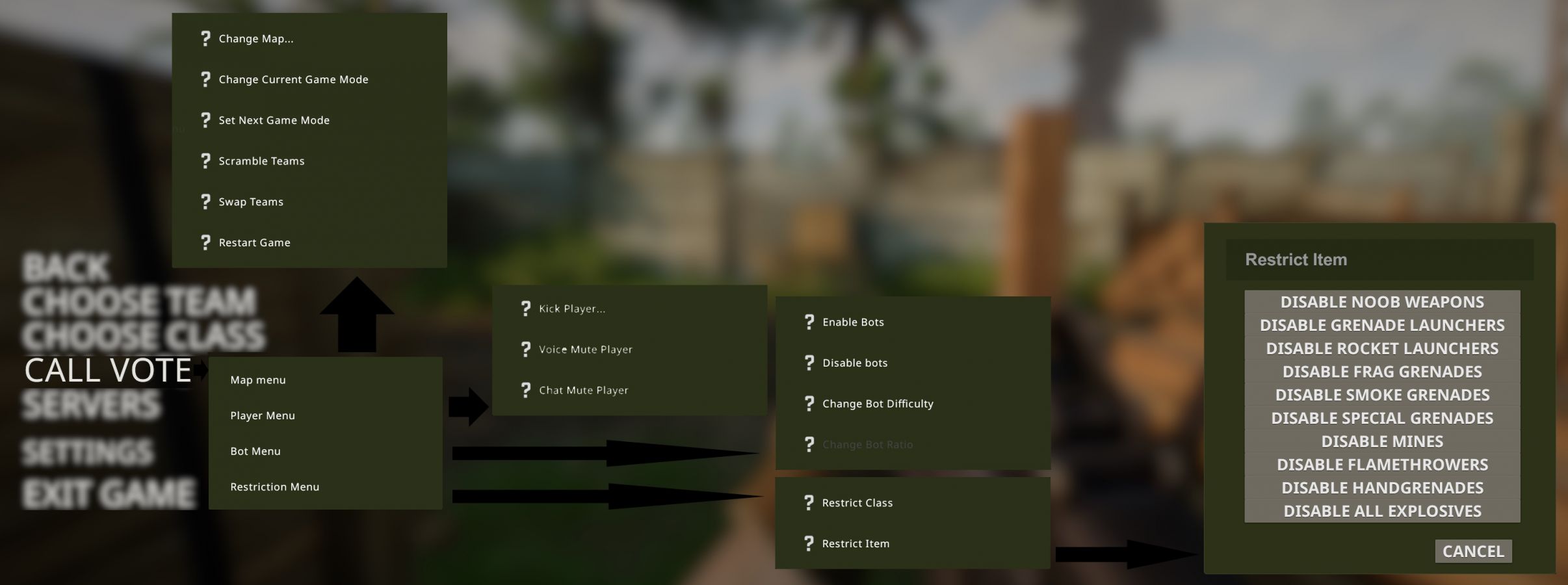 Vote Menu and sub menus
